
Child Safety at the Core.
Time Back for Your Staff.
Every feature starts from the custody record: who was authorized, how each pickup was confirmed, and when. Around it are the tools that make dismissal faster for your front office and simpler for families. No hardware, no clipboards.
Every Pickup Confirmed and Kept in Your Custody Record.
Child safety at dismissal comes down to one question: did an authorized adult pick up the right child, and can you show it? PickupFlow builds the answer in layers, from the day a family joins to the moment a pickup is confirmed.
Ava M.
- Requested by
- Taylor M., authorized
- Confirmed with
- Phone lock (Face ID)
- Arrived
- On foot, front office, 3:09 PM
- Pickup confirmed
- By staff, 3:12 PM
No one can sign up on their own. Your school adds each parent by email, which issues an enrollment code, and only that code creates the account and connects the child.
Parents authorize grandparents, sitters, or carpool families in the app. A new adult joins only with the parent's invitation code, and access can be removed instantly.
Adding an adult and starting a pickup both require the adult's own phone lock: a passcode at minimum, Face ID or fingerprint preferred. A phone without a lock can't do either, and the custody record shows which method was used.
When the adult taps “I’m Here,” a location check confirms they are at the school. Staff see the authorized adult, how they are arriving, and when, for every student in the queue.
Every pickup shows who requested it, who was authorized, how it was confirmed, who confirmed the pickup, and when. Time-stamped and kept by your school. Encrypted in transit and at rest, never sold or used for advertising.
For Schools & Staff
Authorized Pickups and Custody Record
See who is authorized for each student, confirm pickups right from the queue, and keep every pickup in a time-stamped custody record. Permissions update in real time.
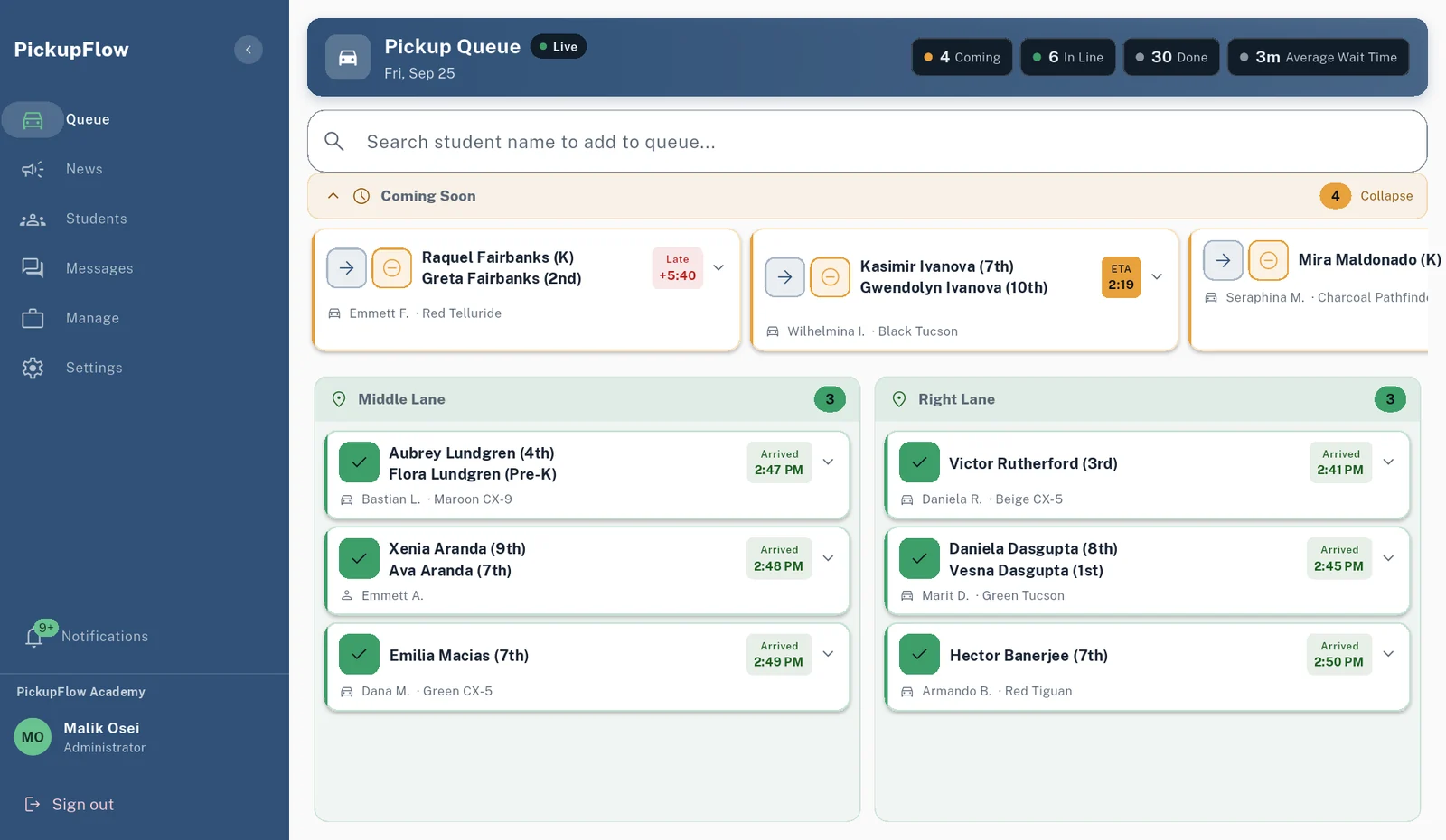
Live Pickup Queue
See who is arriving in real time, by car or on foot, and call each student at the right moment. Staff can add a student by hand for a family without the app.
ETA Countdown Timer
When a parent starts a pickup, the app uses their location once to estimate the drive, then discards it. Staff see a live countdown for each family. No ongoing tracking, nothing stored.
Car Lanes and Walk-Up Points
Set up dismissal the way your campus works: a car rider line with one lane or several, and named walk-up points like the front office or the gym door. Parents choose by car or on foot.
Dismissal Groups and After-Care
Build dismissal groups from your own student lists, each with its own dismissal time, for staggered dismissal or after-care. Families see their child's dismissal time in the app, and every pickup follows the same rules: authorized adults only, confirmed with a phone lock, kept in your custody record.
Early Pickups and Schedule Changes
Parents request an early pickup or a change for one day, a date range, or every week, within the cutoff you set. You decide whether staff must approve.
Announcements, Calendar, and Messaging
Notify families about early dismissals and weather, keep dismissal times and no-school days in one calendar, and message staff and parents with read receipts once your school turns messaging on.
Analytics Dashboard
See total pickups, average wait time, peak pickup hours, and how each car lane is used, for any day, week, month, or quarter. Export to CSV from the web console.
Fast, Safe Onboarding
We load your students and train your team, usually in a day. Your staff join by invitation, and each family enrolls with the code your school issues. No one signs up on their own.
Public System Status
Our status page is public. It shows the availability of the PickupFlow app, sign-in and support services, checked automatically around the clock by a separate server.
For Your Families
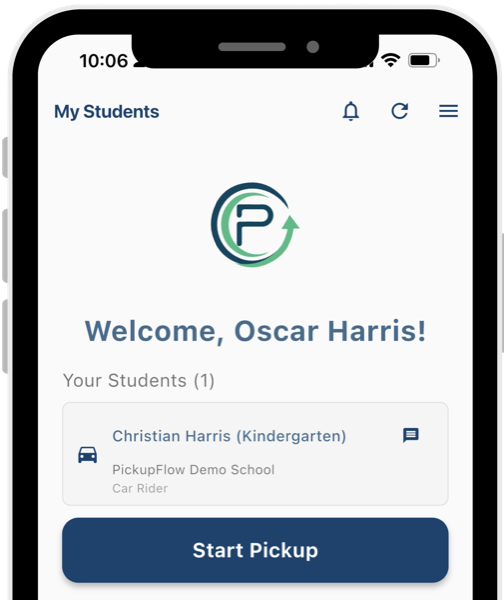
One-Tap Pickup
Parents tap "Start Pickup" when they head to school, and your staff see them in the queue.
School Alerts
Families get instant notifications about early dismissals, schedule changes, and important updates.
Early dismissal today
Pickup at 1:30 PM
Authorized Pickup List
Parents add grandparents, nannies, or friends. Each authorized adult gets their own secure app access.
Multiple Kids, One App
Families manage pickup for all their children, even at different schools, from one app.
Your Calendar in Their Pocket
Families see your school calendar in the app, with reminders for events, no-school days, and early dismissals.
Three Languages
The parent app works in English, Spanish, and Portuguese, so every family at your school can use it with confidence.

See These Features Running at Your School
Schedule a 30-minute demo. Then run a 60-day free pilot with real dismissals before any paid term begins.